

AI agents for business earn their keep on work that’s high in volume, needs a judgment call your own data can support, and can be checked by a person. Seven jobs pass that test: reading the spreadsheets and documents you already have, making the first pass on routine expert calls, reconciling records, sorting incoming work, drafting routine paperwork, answering questions from your own documents, and watching for exceptions. The consequential calls, customer relationships and the rules the agents follow stay with your people.
If you run a company of 50 to 500 people, many of your peers already use AI somewhere in the business: in a May 2026 Census Bureau analysis of its Business Trends and Outlook Survey, 32% of firms with 100 to 249 employees said they used AI, and so did 37% of firms with at least 250.
What is an AI agent?
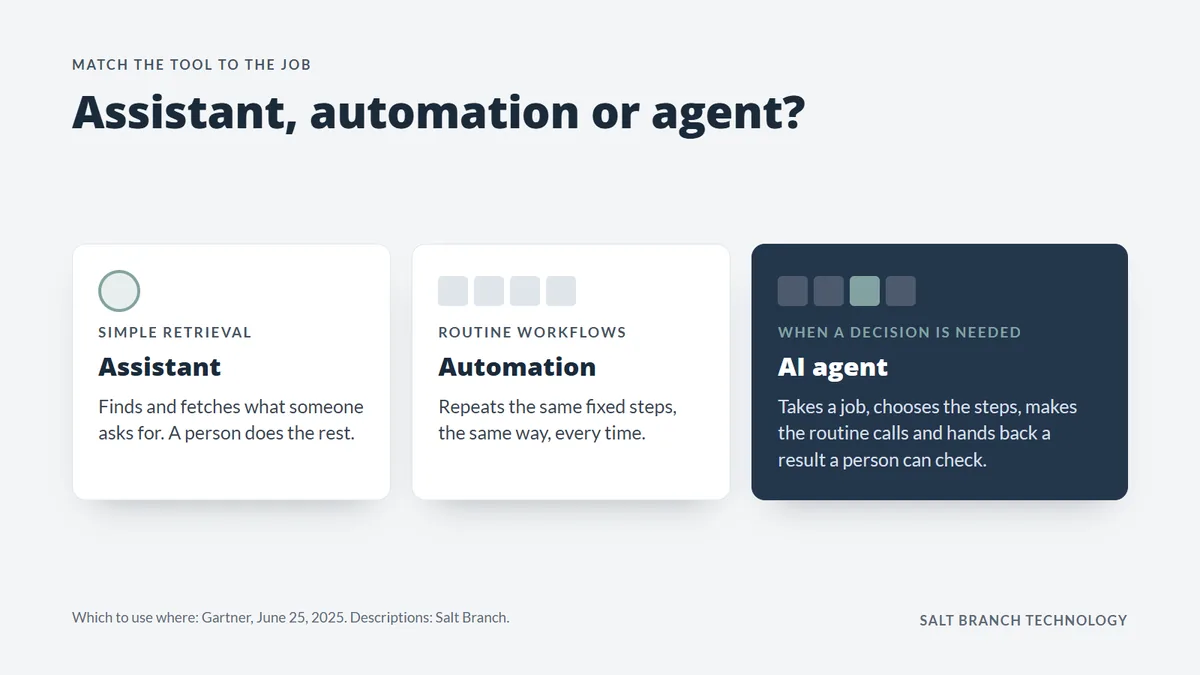
An AI agent is software that takes a job, decides which steps to take, uses your systems and data to carry them out, and hands back a result for review. It sits between a chatbot, which answers a question, and plain automation, which repeats the same steps every time. Think of a capable new hire with a clear job description, the right files and a supervisor for the hard cases.
So which agent is best? Not a product name: it’s whichever one, bought or built, fits a job you can describe, measure and check.
In June 2025, Gartner predicted that over 40% of agentic AI projects, those built on AI agents, will be canceled by the end of 2027, due to escalating costs, unclear business value or inadequate risk controls. It also warns of “agent washing”, vendors rebranding assistants, chatbots and automation tools as agents, and estimates only about 130 of the thousands of agentic AI vendors are real. Its rule of thumb: agents where a decision is needed, automation for routine workflows, and assistants for simple lookups.
Seven jobs worth handing over
The seven jobs worth handing to an AI agent are reading your files, first-pass expert calls, reconciling records, sorting incoming work, drafting paperwork, answering from your own documents and watching for exceptions. Each is high in volume, runs on your own data and can be checked by a person.
1. Read the spreadsheets and documents you already have
An agent can open years of spreadsheets, PDFs and scanned forms, work out what each one holds, and move the facts into one database. It comes first: every other job depends on data an agent can reach.
An equipment finance company we worked with had a decade of Excel workbooks, one for every customer: thousands of them, no two alike. AI agents read every workbook the way a careful analyst would and pulled each machine into one database through layers of checks; by hand, it would have taken hundreds of thousands of hours.
Tip: start with the files nobody can report on today, and have your people settle only what the checks can’t.
2. Make the first pass on routine expert calls, twice
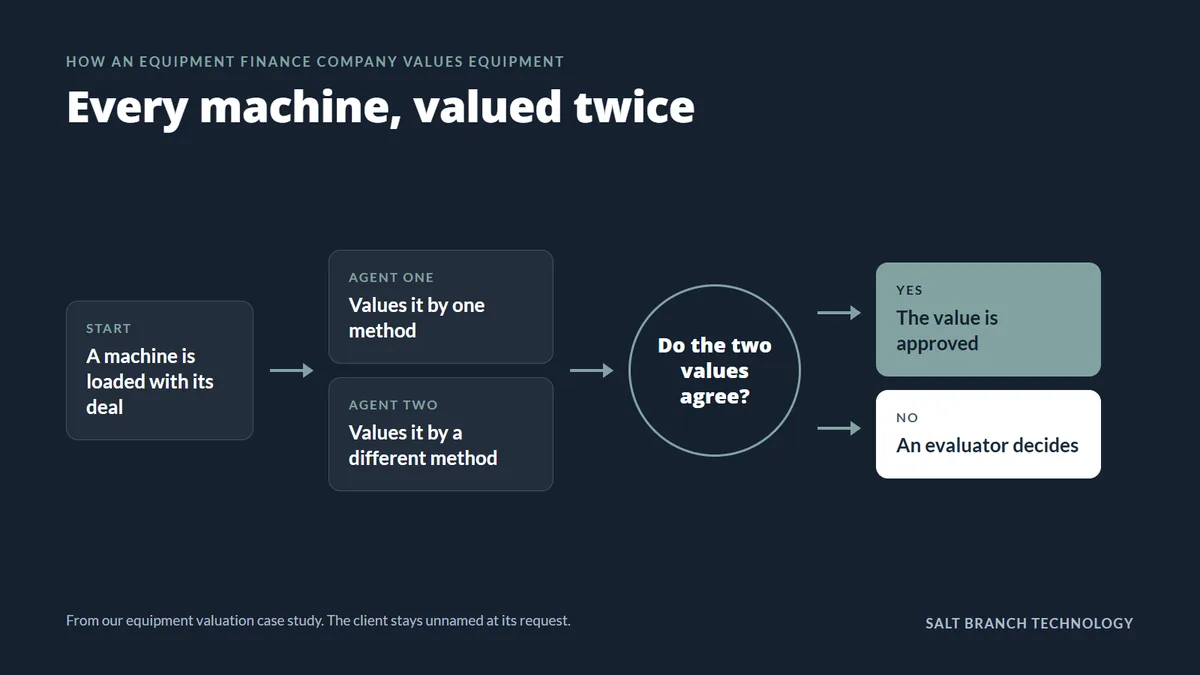
An agent can make the first call the way your experts would, on a quote, a valuation or a job estimate. Run two independent methods, approve the answer when they agree, and send the disagreements to a person.
The same lender now values equipment this way. Before its veteran evaluators moved on, we interviewed them and studied years of their valuations. We also built a database of about 2 million equipment sales and listings. Now two agents value every machine by two different methods. When they agree, the value is approved; when they don’t, a smaller team of evaluators decides.
Capacity stops depending on how many experts you can hire, and yours spend their days on the hard cases.
Tip: track how often the two methods agree; that rate shows how much work the agent can safely take.
3. Reconcile records from more than one source
Matching invoices to purchase orders, or shipments to orders, is high-volume work. Exact matches are plain automation; an agent earns its place on near-misses, like a part number typed two ways, and hands your team only the real conflicts.
We use the same rule on Enslaved Texas, a nonprofit partnership that draws on Texas voter registers from 1867 to 1870. Several AI models read the 160-year-old handwritten register pages, and their readings sit beside an existing index of the records. Fields where every source agrees resolve automatically; conflicts go to a person.
Tip: decide up front what counts as a match, and what goes to a person.
4. Sort and route incoming work
An agent can read each incoming email, form or ticket, decide what it is and how urgent it is, and send it to the right person with the facts attached. A person still replies, with the context in front of them.
Say a distributor with 120 people gets a few hundred emailed orders and questions a day: an agent tags each, pulls the account history and routes it, so the team answers instead of sorting.
Tip: log every routing decision and its reason, and review it like a new hire’s work.
Before you hand over a job, ask: Is it repeated often? Does it run on your own data? Can a person check the result? Does someone own it? Any no means it isn’t ready.
5. Draft the routine paperwork
Quotes, proposals, inspection reports and follow-up letters follow patterns your company already has. An agent can draft them from your data and templates, and a person reviews, edits and sends them.
In a company your size, those drafts often fall to the people customers most want to talk to: estimators, project managers, inspectors. Drafting from your existing systems gives them that time back.
Tip: whoever signs today keeps signing; the agent never writes the final word.
6. Answer questions from your own documents
An agent can answer staff questions from your own policies, manuals, specs and past proposals, and show the page each answer came from. The technique is retrieval over your own documents (RAG): the agent finds the relevant passages first, then answers from them.
If the same few veterans field the same questions every week, the answers leave when they do. Written down and searchable, those answers stay with the business.
Tip: point it only at documents you trust, and make someone responsible for keeping them current.
7. Watch for exceptions
An agent can read every order, invoice, delivery note or contract and flag what doesn’t fit, including what no fixed rule would catch: a supplier’s email that moves a delivery date, or a contract term that changes a price. Plain date and threshold alerts are automation; the agent reads the context. Problems can surface the day they happen, not at month-end.
Tip: let the agent flag, not fix, until it has earned more.
What should stay with your people?
Three things stay with people: the final call on anything with legal, financial or safety consequences; relationships with customers and staff; and the rules the agents follow. An agent can recommend, or approve routine cases within rules your people set, but a person makes the consequential calls and answers for them.
Every agent needs an owner who checks its work, tracks what it saves and decides when it’s ready for more. A pilot nobody owns is an expensive dead end. The escalating costs, unclear value and weak risk controls behind Gartner’s predicted cancellations are what an owner catches early.

AI agents for business at a glance
AI agents for business are most likely to pay back on seven jobs, from reading your files to watching for exceptions, and a person still owns every result. Here is what each can return, and what stays with your people.
| Job | Why it pays | What a person still does |
|---|---|---|
| Read your files | History you can report on | Settles what the checks can’t |
| First pass on expert calls | Capacity without more hires | Decides the disagreements |
| Reconcile records | Only real conflicts surface | Resolves them |
| Sort and route work | Faster first responses | Answers the customer |
| Draft paperwork | Time back on every quote | Reviews and signs |
| Answer from your documents | Answers with their source | Keeps documents current |
| Watch for exceptions | Same-day warnings | Acts on the alert |
If you only do three
Get your data where an agent can reach it, run one routine expert call twice, and name an owner. Data feeds every job, the second method shows how far to trust the agent, and the owner keeps it honest.
What to do next
Start with a list, not a vendor: the jobs your team repeats every week, roughly how often, and who checks the result today. High-volume jobs with a clear checker are your first candidates.
That list is also how we start every project: a conversation about where the hours go, then a map of who touches the work. For a second opinion on yours, see our AI automation work for Fort Worth and Dallas companies.