Our process

From one conversation to software your people love

Our custom software development process is simple on purpose. We discuss your business, map how each person on your team gets their work done, come back with good, better and best options, then build the one you choose in small steps you can see.

1Discuss

It starts with a conversation, not a sales pitch

Tell us how your business runs today: what’s working, what isn’t, where the hours go and what better would look like.

You don’t need a spec or the right vocabulary. We listen for the problem behind the request, because the first idea is rarely the whole story.

You leave withA plain-English summary of what we heard, and where we’d start.

Three people talking through a business problem in an office, the first conversation of a software project

What we’ll ask

  1. Walk us through a normal week. Where does the time go?
  2. Who touches this work, from the first request to the final invoice?
  3. Which systems and spreadsheets does it run through?
  4. If you could fix one thing first, what would it be?
  5. What would make this a win a year from now?

2Map

We map how each person does their part

This is product management, and it’s simpler than it sounds. A business process is really a set of journeys: the customer’s, the sales rep’s, the warehouse’s, the bookkeeper’s.

We follow each one step by step and write down what that person needs to be able to do at every stage. Those needs become the software’s features, so nothing gets built that nobody needs.

An example journey map: four people across five stages of a distributor's quote-to-cash process, with what each needs and where time is lost.
RequestQuoteOrderDeliverInvoice
CCustomerAsk for a price any timeWaits two days for a priceApprove in one clickKnow when it will arriveGet one clear invoice
SSales repRequests buried in emailPrice from today’s costsTurn a quote into an order
WWarehouseConfirm stock before we promiseRetypes every order by handPlan the truck route
AAccountingMatch each delivery to its orderBuilds invoices from paper
An example: a distributor’s path from quote request to paid invoice, mapped for four people. Every business’s map is its own.

Pain points become the plan

  • Requests buried in emailOne inbox for every request
  • Waits two days for a priceQuotes from live prices, same day
  • Retypes every order by handOrders flow straight to the warehouse

The biggest leaks become the first release. The rest wait their turn on the roadmap.

Product management, in plain English

User journey noun

The path one person takes to get their part of the work done, from first step to last.

A sales rep’s path from a customer’s email to a sent quote.

Capability noun

Something a person needs to be able to do. Good software is a set of them, built for the people who use them.

See every open order in one place.

Pain point noun

Where time, money or patience leaks out: retyping, waiting, chasing, guessing.

Typing the same order into two systems.

Must-have noun

What the first release can’t do without. Everything else waits its turn, so you get value sooner.

Live prices on quotes: now. A custom dashboard: later.

“We understand the problem, we understand the users, we dig into that.”

Salt Branch, on the equipment valuation project
Hands sketching app screens on paper with sticky notes, working out the options for a new piece of software

3Choose

Then you get good, better and best options

Most problems have more than one right answer, so you won’t get a single take-it-or-leave-it plan.

You get three options drawn from the same map: what each one covers, what it changes for your team and what it takes. We’ll tell you which we’d pick and why. You decide, and you can start with one and grow into the next.

  1. Good

    Fix the worst hand-off

    One inbox for requests and same-day quotes, using the tools you already have.

    Effort
    Change for your team
  2. Our pick in this example

    Better

    Connect the core journey

    One app from request to order for customers, sales and the warehouse, connected to your accounting system.

    Effort
    Change for your team
  3. Best

    Run it all in one place

    Every role and every step, with AI doing the routine work and reports that build themselves.

    Effort
    Change for your team

The small grids are the map above: four people across five stages. Filled squares are the steps each option takes care of; the faintest are steps that person isn’t part of. Your three options are built from your own map.

4Build

We build in small steps, and you see every one

We don’t disappear for six months and come back with a surprise.

We build the most important piece first, put it in front of the people who’ll use it, listen, and adjust. Each round adds the next most valuable piece, so the software gets better while the project is still running, and changing direction costs a round, not a rewrite.

You leave withWorking software early, and a little more of it every round.
Each round of building: we build working software and show it, your team tries it and we learn, what they tell us shapes the adjustments, and the next round begins. Build Show Learn Adjust working software your team tries it what they tell us the next round Every round adds the next most valuable piece
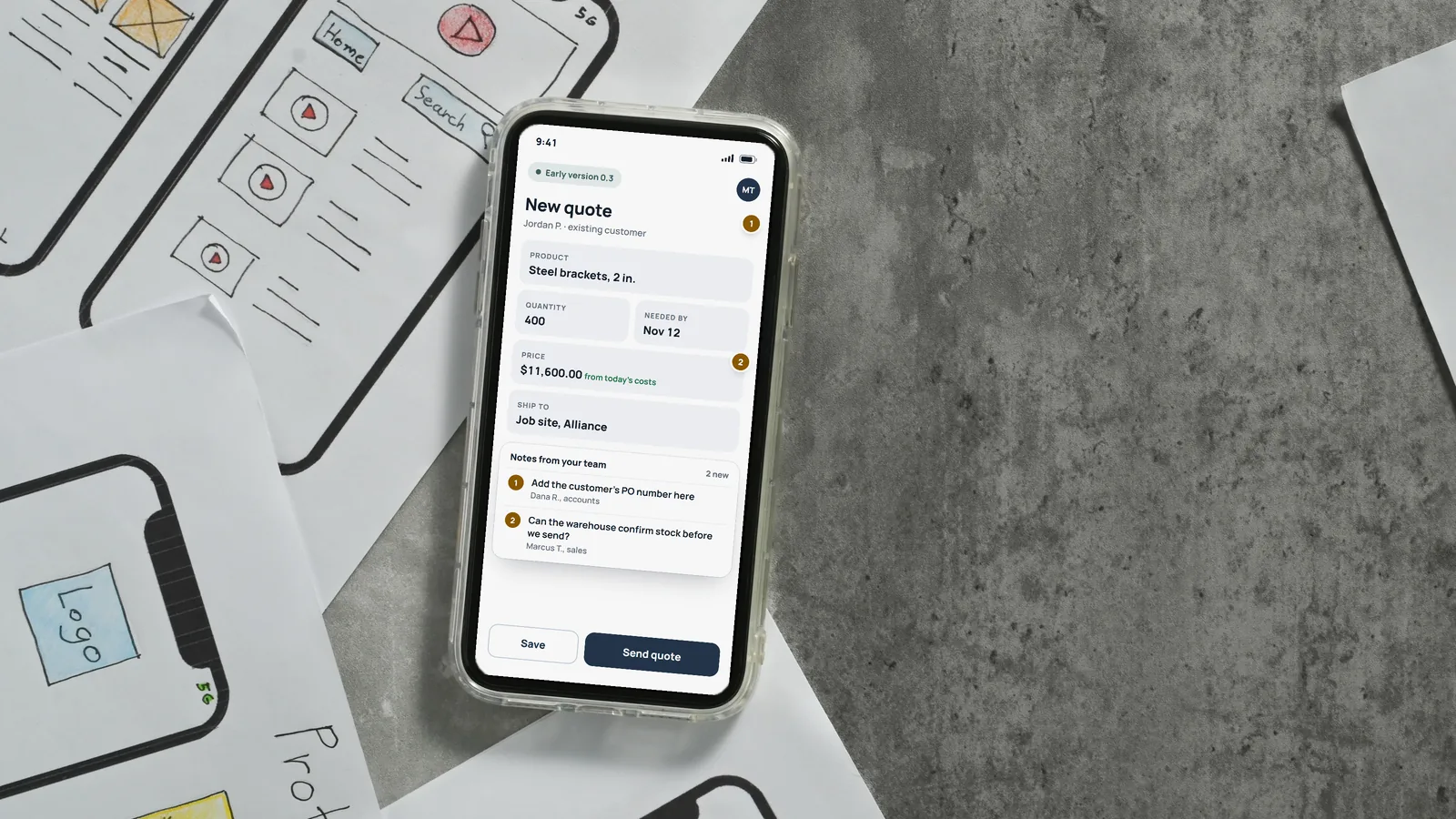
A phone showing an early version of a quote request screen with two notes from the team, among paper sketches of app screens
An early version on a phone, with notes from the people who’ll use it. The next round starts from those notes.

5Improve

Launch is the start, not the finish line

We roll it out with your team, train the people who’ll use it and stay close while it settles in.

Then we watch how it’s really used and keep improving it, one release at a time, in the order that pays off most.

You leave withSoftware your team actually uses, and a roadmap for what comes next.

A team member showing two colleagues how to use new software at their desks

The example, one release at a time

  1. Live

    Release 1 · The must-haves

    • One inbox for every request
    • Same-day quotes from live prices
    • Orders straight to the warehouse
  2. Building now

    Release 2 · The next most valuable

    • Invoices that build themselves
    • Delivery updates for customers
  3. Planned

    Release 3 · What earned a place

    • Truck routes planned for you
    • A weekly report that builds itself

Questions

Questions about our process

Do we need to know exactly what we want before we call?

No. Most people start with a problem, not a plan, and that’s the right place to start. Working out what to build is the first part of our job.

Do we need technical people on our side?

No. You bring the knowledge of your business; we bring the technology and explain every choice in plain English. We’ll ask for time with the people who do the work, because they know where the hours go.

What is a user journey, in plain terms?

It’s the path one person takes to get their part of the work done, step by step. Mapping each person’s journey shows where time leaks out and what the software needs to do for them, before anything is built.

Why good, better and best?

Because the right size depends on your budget, your timeline and how much change your team can take on at once. Three options let you weigh those side by side, and you can start with one and grow into the next.

What if our needs change partway through?

They usually do, and the process expects it. Because we build in small steps and show you each one, changing direction costs a round, not a rewrite.

Will it work with the systems we already use?

Usually, yes. We connect new software to the systems you already run. For an equipment lender, the platform we built stays in step with their originations and servicing systems and Salesforce.

Step one

Let’s start with a conversation.

Tell us what you’d like to improve, automate or build. We’ll listen, ask good questions and tell you plainly what we’d do.